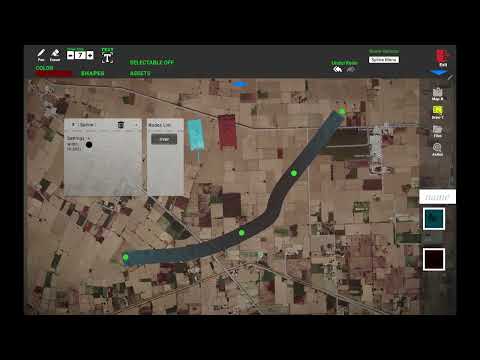
Watch the full project walkthrough: SANDBOX Military Simulation on YouTube
The Call That Changed Everything
It started like many high‑stakes projects do—with a crisis.
Phoenix Technologies had been developing SANDBOX, a tactical planning system for military operations. The brief was ambitious: create a multi‑device platform where commanders could plan missions collaboratively, visualise terrain in 3D, and transition seamlessly between physical sand tables and digital maps.
But the project was stuck. Deadlines were slipping. The codebase had grown into what developers call a “big ball of mud”—15 000 to 100 000 lines of code crammed into single files. Debugging was a nightmare. Features that should have taken days were taking weeks.
Then they called me.
Urgent was an understatement. The client needed this system operational—and they needed it now.
The Brief: What SANDBOX Had to Do
The system needed to support two radically different operational modes:
Calibration Mode – Four Xbox Kinect sensors mounted above a physical sand table. As commanders sculpted the terrain with their hands, the sensors would capture real‑time depth data, generating a colour‑mapped 3D mesh inside the Unity engine. Low areas became rivers and valleys; elevated areas became hills and ridgelines—mirroring the physical sand exactly.
Map Mode – Geo‑referenced MBTiles maps displayed on tablets. The same planning tools—military symbols, spline tools for roads and borders, waypoint networks, and asset placement—available on a digital canvas.
All of this had to work across:
- A Mac Mini server running backend services
- Up to 10 Samsung Galaxy S9 tablets for commanders and syndicate members
- 4 Xbox Kinect sensors for terrain scanning
- A local Wi‑Fi network with automatic device discovery
Oh, and every device had to sync in real‑time during multiplayer sessions. No static IPs. No manual configuration. Just turn it on and go.
The Approach: Starting from Zero
When I looked at the existing codebase, I faced a choice: patch the existing system and hope it held together, or rebuild from the ground up.
I chose the latter—with the client’s permission.
Why rebuild?
- The existing architecture couldn’t support real‑time multiplayer
- Debugging was impossible due to monolithic file structures
- Adding new features risked breaking existing functionality
- The Kinect integration was unstable and unreliable
I took their existing resources—models, textures, design documents—and started creating a clean, modular Unity project. My goal was simple: build something that would actually work in the field.
Progress came fast. Within a month, I had a functional prototype that outperformed their original system. The client was impressed. Then came the next challenge.
Life at the Cantt: Deployment in Gujranwala
They flew me to Gujranwala Cantt—a military installation in Pakistan—for deployment.
This wasn’t a typical software project.
I lived on‑site for weeks, working day and night. Meetings and visits came with little warning. As the solo Unity developer, I handled:
- Every line of C# code in the Unity client
- Networking architecture and synchronisation
- UI/UX implementation across all devices
- MBTiles map rendering and optimisation
- Deployment scripts and device configuration
I couldn’t have done it alone. A Python developer handled the Kinect sensor processing—the heavy lifting of converting depth data into usable 3D meshes. That partnership was critical to hitting our deadlines.
The client made sure we were comfortable—dedicated workspace, separate room for my wife when she visited, structured meal schedules, even laundry services. They understood that when you’re building military‑grade software, your team needs to focus on the mission, not logistics.
The Architecture: How It All Works
Server‑Authoritative Multiplayer
The Mac Mini runs as the Netcode host. When the DS (Directing Staff) device connects first, it starts the session. Syndicate tablets join automatically via UDP broadcast discovery. No IP configuration needed.
This is where the magic happens: Every device sees the same plan in real‑time. Syndicate members work independently, but the DS can view any device’s canvas at any time. It’s collaborative planning without the chaos.
Waypoint & Movement Planning
The Action Mode is where tactical planning gets real:
- Add linked waypoints across the terrain
- Assign vehicles to waypoints with drag‑and‑drop
- Enable/disable waypoints for phased movements
- Set arrival triggers to activate subsequent groups
Example scenario: Waypoint B is disabled at mission start. Waypoint A triggers Waypoint B when the first group arrives. The second group begins moving only when the first reaches its objective. This enables complex, multi‑phase operations with zero manual intervention.
Smart Data Management
No plan data is ever lost. The system stores session data as structured JSON on the server, keyed by user ID. If a tablet disconnects or crashes, it reconnects and reloads its state automatically.
The Results: A System That Delivers
After three months of development and deployment, SANDBOX was operational. The client had:
✅ A stable, modular Unity project that’s maintainable and extensible
✅ Real‑time multiplayer across up to 10 devices
✅ Two operational modes (Calibration + Map) with consistent tooling
✅ Automatic device discovery—no static IPs required
✅ Offline support—tablets work even without the server
✅ Kinect‑based terrain scanning that matches physical sand tables in real‑time
The feedback from the field? Commanders could plan missions faster. Training sessions were more interactive. The transition from physical sand table to digital map was seamless—something that had never worked reliably in their previous system.
What This Project Taught Me
1. Rebuilding is sometimes faster than debugging
When a codebase is fundamentally broken, don’t patch it—replace it. The client was nervous at first, but the results spoke for themselves.
2. Collaboration matters
I couldn’t have delivered the Kinect integration without the Python developer’s expertise. Great projects are built by great teams, even when that team is just two people.
3. On‑site deployment reveals everything
No amount of testing prepares you for the field. Power fluctuations. Network interference. User errors. Being on‑site meant I could fix issues as they happened—and that built trust with the client.
4. Military clients value reliability above all
They don’t need the flashiest features. They need systems that work every time, no exceptions. SANDBOX delivers on that promise.
Why This Matters for Your Next Project
If you’re planning a simulation, training system, or collaborative planning tool, you need a developer who understands:
🔹 Real‑time synchronisation without network headaches
🔹 Sensor integration (Kinect, camera, or custom hardware)
🔹 Multi‑platform deployment (Android, Windows, macOS)
🔹 Field‑tested reliability that survives deployment
I’ve built that with SANDBOX. I can build it for you too.
Got a Similar Project in Mind?
The fastest way to reach me is on WhatsApp.
Whether it’s defence simulation, industrial training, or any real‑time collaborative system—let’s talk about what’s possible.
Tags: Military Simulation, Unity 3D, Tactical Planning, Kinect Integration, Multiplayer Systems, MBTiles, Defence Tech, Real‑time Synchronisation, Android Development, C# Programming
About the Author
Syed Suleman Shah is a Unity developer specialising in high‑stakes simulation and real‑time systems. He has delivered projects for defence, aerospace, and enterprise clients across Pakistan and the Middle East.
Source code for SANDBOX is proprietary and delivered under strict NDA. This case study reflects the project’s architecture and outcomes—not the code itself.