
Every Unity 3D project needs API integration. Most Unity developers write it from scratch every single time. I got tired of that.
The Same Problem. Six Times in a Row.
After the VR Speech Trainer project — where I integrated Smule’s audio analysis API into a Quest 2 application for the first time — something clicked.
Not about VR. Not about AI.
About API integration in Unity 3D.
Every project I took on after that needed it. REST calls. Auth headers. JSON parsing. Error handling. Token storage. Refresh logic. The same plumbing, written from scratch, every single time — with slightly different bugs each time I wrote it.
By the end of 2024 I had built custom ASP.NET Core backends for multiple projects and was doing API integration so frequently that I’d started copying code between Unity projects like it was a normal thing to do.
It isn’t. It’s a smell. And it was telling me something.
Build the package.
The Idea That Started It
I was looking at a Swagger JSON file — the kind your backend auto-generates that lists every endpoint, every method, every parameter — and I thought:
This file already knows everything. The endpoint paths. The HTTP methods. The request and response shapes. Why am I typing all of this out again inside Unity 3D?
What if I could take that Swagger JSON, drop it into my Unity project, and have the API layer mostly configure itself?
That was the idea. And that’s what WitClientApi became.
How It Works
Step 1 — Drop in the JSON
Download your Swagger JSON from your backend. Drop it anywhere inside your Unity 3D Resources folder. That’s it. The package reads it at runtime.
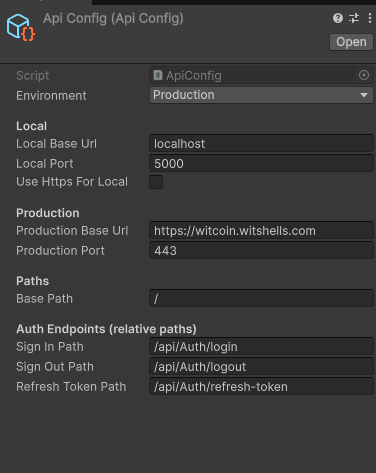
Step 2 — Create an ApiConfig
[CreateAssetMenu(menuName = "WitShells/ApiConfig", fileName = "ApiConfig")]
This is a ScriptableObject — Unity’s native configuration asset. You create one in your project, then fill in:
- Environment — Production, Testing, or Local
- Base URL — your API host per environment
- Port — if needed
- JSON path — where your Swagger file lives in Resources
- Auth paths — SignIn, SignOut, RefreshToken endpoints
Switch between production and local with one dropdown. No code changes. No hardcoded URLs buried in MonoBehaviours.
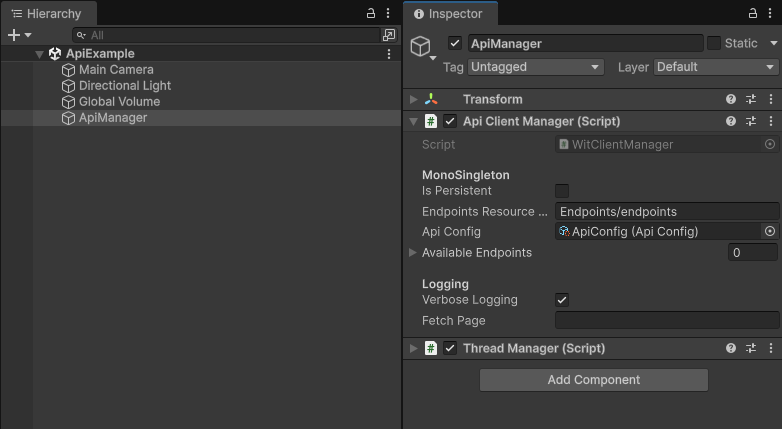
Step 3 — Add WitClientManager to Your Scene
One MonoBehaviour. Drop it on a GameObject. Point it at your ApiConfig. Done.
The manager handles the HTTP layer, reads your Swagger endpoints, manages your auth tokens, and exposes the call methods to every script in your project via singleton.
Making Calls — Two Ways
This is where the package earns its keep. Two modes depending on what you’re building.
Dynamic Mode — For Quick Work
When I need to move fast and I don’t want to define a model class, I use the dynamic overload:
public void CallEndpoint(
    string key,
    object parameters,
    UnityAction<object> onSuccess,
    UnityAction<string> onFail
)
Pass the endpoint key. Pass parameters as any object. Get back an object in the success callback — parse what you need from it. No model class required. Prototype speed.
Need custom headers? There’s an overload for that too:
public void CallEndpoint(
    string key,
    object parameters,
    Dictionary<string, string> customHeaders,
    UnityAction<object> onSuccess,
    UnityAction<string> onFail
)
Typed Mode — For Complex Work With UI Binding
When I’m binding responses to UI — populating lists, displaying user data, driving game state — I want strong types. No casting. No guessing. Full IntelliSense:
public void CallEndpoint<TRequest, TResponse>(
    string key,
    TRequest dto,
    UnityAction<TResponse> onSuccess,
    UnityAction<string> onFail
)
Define your request DTO. Define your response model. Pass them as generics. The package handles serialization and deserialization. Your success callback receives a fully typed TResponse — ready to use.
Same overload with custom headers available:
public void CallEndpoint<TRequest, TResponse>(
    string key,
    TRequest dto,
    Dictionary<string, string> customHeaders,
    UnityAction<TResponse> onSuccess,
    UnityAction<string> onFail
)
Authentication — The Part That Usually Breaks Everything
JWT auth in Unity projects is where most homemade solutions fall apart. Token expiry. Refresh logic. Race conditions when multiple calls fail simultaneously.
WitClientApi handles this through a dedicated AuthService class — and I strongly recommend you override it for your own project rather than using it as-is.
Here’s the interface:
public interface IAuthService
{
    void SignInAsync(
        object credentials,
        UnityAction<TokenResponse> onSuccess,
        UnityAction<string> OnFail = null,
        CancellationToken ct = default
    );

    void SignOutAsync(CancellationToken ct);

    Task<bool> RefreshTokenAsync(CancellationToken ct);
}
Sign in. Sign out. Refresh. Three responsibilities. Clean separation.
The manager uses ITokenStorage to get your bearer token before every authorized request. If a request comes back with an invalid token response, it automatically attempts a refresh and retries — without you writing a single line of retry logic.
Token Storage — Own It Yourself
This is the part I feel most strongly about.
Don’t use the default token storage. Override it.
public interface ITokenStorage
{
    Task SignInAsync(TokenResponse tokens);
    Task SignOutAsync();
    Task<string> GetAccessTokenAsync();
    Task<string> GetRefreshTokenAsync();
    Task<TokenResponse> GetTokensAsync();
}
Implement this interface your way. Store tokens in PlayerPrefs. Encrypt them. Use platform secure storage. Use a custom vault. Whatever your project requires — the package doesn’t care how you store them, only that it can retrieve them through this interface.
This is deliberate. Token storage is a security decision. It shouldn’t be made for you by a package.
Override the manager class. Assign your AuthService. Assign your ITokenStorage implementation. The rest handles itself.
What It Depends On
To run WitClientApi you need two other packages from the same repository. Both are free and public.
Design Patterns Package
Provides the singleton pattern the manager uses, plus a collection of other reusable patterns I reach for constantly in Unity projects. The singleton implementation here is clean — no DontDestroyOnLoad abuse, no static field nightmares.
ThreadManager Package Handles background thread work and returns results as Unity 3D events. API calls run off the main thread — ThreadManager is what brings results back safely so you can update UI without threading exceptions. I’ll write a full breakdown of ThreadManager in its own article — it’s genuinely one of the most useful things in the repository.
The Practical Reality
This package has shipped in five to six production projects at this point.
Every time I found something broken — a race condition in the refresh logic, an edge case in the response parser, a serialization issue with nested objects — I fixed it in the package, not just in the project. That’s the compounding value of maintaining a shared library rather than copying code.
The dynamic mode came first. The typed generic overloads came after I started building more complex UIs and realized I was writing the same casting code in every success callback. The custom headers overloads came after a project that needed per-request auth tokens that weren’t JWT.
It grew from real problems. Not from designing a framework in the abstract.
How to Get It
The package is public on GitHub:
WitClientApi — Reusable Unity 3D API Integration
Add it via Unity 3D Package Manager using the Git URL. Install the Design Patterns and ThreadManager packages from the same repository. Create your ApiConfig ScriptableObject. Drop your Swagger JSON into Resources. Add WitClientManager to your scene.
You’re making API calls in Unity in under 10 minutes.
What This Project Taught Me
1. Copy-paste between projects is a warning sign, not a workflow
The moment you’re copying the same code into a third project, that code wants to be a package. The sooner you extract it, the sooner every future project benefits.
2. Swagger JSON is already your documentation — use it
Every modern backend generates it. It contains everything you need to know about an API surface. Building a Unity 3D integration layer that reads it directly removes an entire category of human error.
3. Build for override, not for configuration
The ITokenStorage and IAuthService interfaces exist because security decisions belong to the project, not the package. Design your shared tools with clear extension points. Make the default useful. Make the override obvious.
4. A package you maintain is better than code you copy
Bug fixed in the package means bug fixed everywhere. Improvement made once benefits every project. The upfront cost of maintaining a repository pays back faster than it seems.
What’s Next
ThreadManager deserves its own article — it solves a problem every Unity developer hits when they start doing async work and Unity’s main thread restriction bites them.
→ Coming next: ThreadManager — How I Made Background Jobs and Unity Events Work Together Without Threading Headaches
Working on a Unity Project That Needs a Backend?
If you’re building a Unity application — VR, mobile, desktop — that needs clean, maintainable API integration with a real backend, this is the kind of architecture we bring to every project at WitShells Studio.
We’ve shipped it across defense simulation, educational VR, and commercial applications. We know what breaks in production and we’ve already fixed it.
📩 sayedsulaiman607@gmail.com · cto@witshells.com 💬 WhatsApp Me →
Tags: Unity, API Integration, C#, Unity Package, JWT Authentication, ASP.NET Core, REST API, Game Development, Open Source, WitShells Studio, Unity Tools, Developer Productivity
About the Author
Syed Suleman Shah is CTO of WitShells Studio — a VR and interactive experience studio delivering immersive environments for education, defense, and enterprise clients across Pakistan and the Middle East.
© 2026 WitShells Studio (SMC-Private) Limited. All rights reserved.