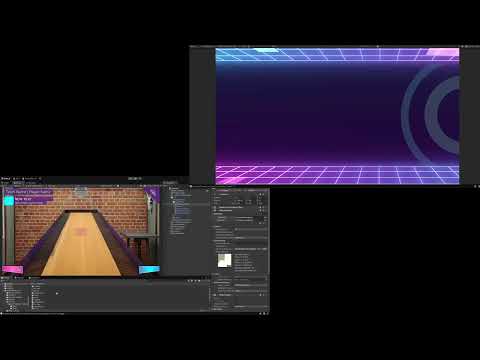
Sensor-based physical arcade. Real pucks. Virtual scores. Three applications talking to each other in real time. Watch the full project walkthrough: Shuffleboard-simulation-video
The Call That Came After the Interview
In 2024 I was looking for onsite work in Karachi.
Software house visits. Resume drops. The usual circuit.
One of them was a Karachi-based software house. The interview went well — but they were clear. Their work was mostly Unreal. Unity wasn’t their immediate need.
“We’ll contact you if something comes up.”
A few months later, they did.
The project: a physical shuffleboard arcade game for a venue client. Players throw real pucks down a real board. Camera sensors track where the pucks land. A Unity simulation mirrors the gameplay on a big screen — scores, turns, multiplayer, team modes. An operator runs the whole thing from a tablet.
The idea was genuinely interesting. Physical sport. Digital tracking. A venue experience that blends both.
I was between projects. The timing was right. I said yes.
What the System Had to Do
Three separate applications. One connected experience.
The Python Server — written by another developer on their team. Camera sensors feed raw puck position data into a Python backend that processes the tracking in real time. Not my part.
The Unity Simulation — running on a PC connected to a large venue screen. This is what the players watch. The board. The puck positions. The score. The turns. The game flow from lobby to game over. My part.
The Operator Tablet — an Android application. The staff member running the venue controls the game from here. Team setup, game mode selection, starting and stopping rounds, managing the scoreboard. Also my part.
Two Unity applications. One Python backend. All three communicating in real time.
The document was clear on this. I read it. I confirmed I understood it.
Then I started building — and realized I had mentally modeled it as something simpler.
The Miscalculation
Here’s what I had pictured: one PC, two monitors. One codebase. The operator UI on one screen, the simulation on the other. Simple.
Here’s what was actually needed: two entirely separate applications. Separate codebases. Separate deployment targets. Android tablet on one side, PC simulation on the other. And they needed to talk to each other — and to the Python server — in real time.
That’s not a minor difference. It’s the difference between building one thing and building a networked system.
I caught it within the first few weeks. Went to the team. Laid out what I was seeing.
Their position was fair: it was in the document. I had confirmed. The scope wasn’t changing and the budget wasn’t changing.
My position was also fair: I had genuinely misread the deployment architecture and the fixed price didn’t account for a full custom networking layer.
Neither position was wrong. Both were true simultaneously.
I made a call.
I’ll build it. All of it. Whatever it takes.
Not because the situation was ideal — it wasn’t. But because the alternative was stopping, and stopping wasn’t something I was willing to do.
Building the Networking Framework in a Week
Unity Netcode was the obvious first choice. I tried it. The problem: Netcode is designed for Unity-to-Unity communication with a shared codebase. My setup was a Unity tablet app talking to a Unity PC simulation talking to a Python server. Three different applications. Netcode didn’t fit cleanly.
I made the decision that cost a week and saved the project.
Build the protocol from scratch.
TCP for game communication — turn results, score updates, game state changes. Accuracy non-negotiable. TCP’s guaranteed delivery was the right choice.
UDP for real-time sensor data — puck position updates streaming from the Python server. Speed over guaranteed delivery. A dropped position packet is recoverable. A dropped score update is not.
The framework I built:
- Auto-discovery — applications find each other on the local network without manual IP configuration
- Connection management — handles drops, reconnects, device registration
- Message serialization — structured data packets with type headers for routing
- Multi-threaded processing — each connection runs on its own thread so the main application never blocks
Seven days. A working, tested, custom TCP/UDP networking framework running across three applications.
This is also what eventually became the foundation for ThreadManager — the multi-threading architecture I built here proved itself under real conditions and I extracted and refined it into a reusable package.
The Simulation
The simulation is what players watch on the big screen. It had to be immediately readable from a distance and immediately engaging as a spectator experience.
Working with the company’s 3D artist, I integrated the game environment — a stylized shuffleboard lane with team color coding, puck models, and clear visual feedback for scoring zones.
The game flow:
Lobby — team selection, player count, game mode. Operator configures from the tablet. Display shows the setup.
Active Turn — the current player steps up to the physical board and throws. The Python server tracks the puck. Position data streams over UDP to the simulation. The virtual puck appears on the big screen at the exact landing position. Score calculated instantly.
Score Display — running totals, team standings, current frame.
Game Over — final scoreboard, winner announcement, return to lobby.
All of this driven by the operator’s tablet. One person running the whole experience.
The Operator Tablet
The tablet application is the control layer the venue staff never has to think about.
The company’s UI/UX designer provided the designs. I integrated them into a clean Android application that gave the operator full visibility and control:
- Start and stop rounds
- Override scores manually if a sensor misread occurs
- Switch game modes between sessions
- Monitor connection status to both the simulation and the Python server
- Manage the queue if multiple groups are waiting
The operator interface had to be simple enough that venue staff with no technical background could run a full session without help.
The Simulator I Built That Nobody Asked For
The Python sensor integration was on another developer’s timeline. Not mine.
As the weeks went on, it became clear that his part was going to take longer than the project could afford to wait. I was on a fixed cost — not a monthly salary. Every week waiting was a week I wasn’t getting paid.
So I built a puck throw simulator on the operator tablet.
The operator could drag a virtual puck to a position on a tablet representation of the board and submit it as a throw. The simulation would respond exactly as it would to a real sensor input.
This served two purposes: it let the company demonstrate the full game flow to their client without needing the sensor hardware ready. And it cleared me — I could demonstrate that my deliverable was complete and functional, independent of the Python side.
The game worked. Every feature. Every mode. End to end.
Where It Ended
The simulation was complete. The tablet application was complete. The networking framework was complete. The simulator was built on top of everything else.
Then came a request to redo the UI/UX designs.
Not fix bugs. Not adjust layouts. Redo — new design direction, new visual approach.
That wasn’t in scope. Ongoing support is one thing. A UI redesign is a new contract.
I said no clearly.
What followed was the kind of conversation that happens when a project ends without full alignment — old points dug up, effort on both sides not fully acknowledged, frustration on both sides not fully heard.
I was paid half the agreed amount.
I moved on.
What This Project Taught Me
1. Read the document. Then read it again. Then ask the question you think is obvious.
The miscalculation on the deployment architecture cost me weeks of uncompensated work. It was in the document. I confirmed it. I still got it wrong. Now I draw the system architecture myself before I confirm any scope — and I show the client my drawing before I sign anything.
2. When the scope expands, address it immediately or absorb it completely
I chose to absorb the networking work and deliver without complaint. That was my decision and I’d make it again — the work was worth doing and I learned from it. What I shouldn’t have done is left the boundary conversation about UI redesigns until we were already at the end. Earlier is always better.
3. Building your own protocol teaches you things no tutorial can
Unity Netcode, Mirror, Photon — they’re excellent tools when they fit. When they don’t fit, you build your own. That week of writing raw TCP/UDP socket code, managing threads, handling connection drops — it went directly into ThreadManager and then into six other projects. The hard path compounded.
4. A simulator that makes you redundant is good engineering
The puck throw simulator wasn’t asked for. It was the right call. When an external dependency is blocking your delivery, you build around it. Your job is to deliver, not to wait.
5. Know what you won’t do — and say it early
I knew redoing the UI was out of scope. I should have said it the moment it was suggested, calmly and immediately, rather than letting the conversation develop into an argument. “That’s a new scope item — happy to discuss a separate contract” is a complete sentence. Use it.
The Result
Three interconnected applications — Unity PC simulation, Android operator tablet, Python sensor backend — connected by a custom TCP/UDP networking framework built from scratch in a week. A complete venue arcade experience with team multiplayer, real-time puck tracking, operator control, and a full game flow from lobby to scoreboard.
Forty days of work. Part time teaching on the side. Working from home and from office.
One of the most technically demanding things I built in 2024.
It deserved a better ending. But the engineering was solid — and the lessons from it ran through every project that followed.
Building Something That Needs Custom Networking or Sensor Integration?
Multi-application systems. Real-time data pipelines. Custom protocols. Hardware integration. If your project connects physical and digital — this is the kind of architecture we build at WitShells Studio.
📩 sayedsulaiman607@gmail.com · cto@witshells.com 💬 WhatsApp Me →
Tags: Unity Networking, TCP UDP Unity, Custom Protocol, Arcade Game, Sensor Integration, Multiplayer Unity, Android Unity, Enterprise Subcontract, C# Networking, WitShells Studio, Pakistan, Game Development
About the Author
Syed Suleman Shah is CTO of WitShells Studio — a VR and interactive experience studio delivering immersive environments for education, defense, and enterprise clients across Pakistan and the Middle East.
© 2026 WitShells Studio (SMC-Private) Limited. All rights reserved.