Unity’s main thread rule is simple. Working around it without losing your mind — that’s the part nobody warns you about.
The Project That Made Threading Click
In 2024 I was deep inside a networking project — a digital shuffleboard game that needed a custom UDP + TCP hybrid protocol built from scratch.
No Unity Netcode. No Mirror. No third-party library.
Just raw sockets, a command pattern, and the requirement that the system auto-discover devices on the network and handle both lightweight real-time data over UDP and heavier reliable data over TCP — without dropping either.
To make it work, I needed dedicated threads. The server got its own thread. Every connected client got its own thread. The protocol logic lived entirely off the main thread so it could never block the game loop.
That project carved threading into my brain in a way tutorials never could. I understood not just how threads work but why you need them structured the right way — and what happens when they’re not.
By the time I finished it, I had the foundation for something I’d been putting off for months.
Build the package already.
The Problem Every Unity Developer Hits
Unity has one rule about threading that never changes:
You cannot touch Unity objects from a background thread.
No transform.position. No UI updates. No Debug.Log from a worker thread — well, you can, but it’s not safe. Any attempt to call Unity APIs from outside the main thread throws an exception, corrupts state, or crashes the editor silently.
This creates a very specific pain for any Unity developer doing real work:
- Calling a REST API? Needs a background thread. Result needs the main thread.
- Parsing a large JSON file? Block the main thread and your game freezes.
- Running pathfinding calculations? Same problem.
- Processing audio or sensor data? Same problem.
- Loading files, downloading assets, running ML inference? All of it.
The community answers to this are all partial:
Coroutines — great for timed sequences, terrible for CPU work. They run on the main thread. A heavy coroutine is a frame drop.
Task.Run() — works, but delivering the result back to Unity safely requires SynchronizationContext wrangling that most tutorials skip. Get it wrong and you’re debugging threading exceptions that only appear in builds, not the editor.
Unity Job System + Burst — powerful, but designed specifically for data-oriented work on structs. Not general purpose. Steep learning curve for anything outside its intended use case.
UniTask — excellent async/await integration, but still async-first. Not event-driven. Requires a different mental model.
What I wanted was something simpler.
Run this work off the main thread. When it’s done, call me back on the main thread. Use Unity events so it fits naturally into how Unity developers already think.
That’s ThreadManager.
How ThreadManager Works
The Architecture in One Sentence
ThreadManager maintains a pool of background JobThread workers. You enqueue a job with callbacks. The job runs off the main thread. Results fire back as UnityAction events on the main thread — safe to use anywhere in Unity.
The Thread Pool
ThreadManager (MonoSingleton)
    ├── JobThread 1  [BlockingCollection queue, capacity 1000]
    ├── JobThread 2
    ├── JobThread 3
    └── JobThread 4  ← configurable via Inspector
Each JobThread has its own job queue, its own processing loop, and its own main-thread action queue. FixedUpdate pumps the main-thread queue — so results always come back at a predictable point in the frame, not mid-physics or mid-render.
The manager picks the best available thread automatically — prefers idle threads, falls back to the thread with the smallest queue. You never think about which thread you’re on.
Using It — Three Ways, All Simple
The Quickest Way: QuickThreadJobs
For one-liners. No job class needed. Just pass a function, get a result.
Run any function off the main thread:
QuickThreadJobs.RunFunction<int>(
    () => DoHeavyCalculation(),          // runs on background thread
    result => UpdateUI(result),          // fires on main thread
    error => Debug.LogError(error)       // fires on main thread
);
Run an async function:
QuickThreadJobs.RunFunctionAsync<string>(
    async () => await FetchDataFromApi(),
    result => DisplayResult(result),
    error => ShowError(error)
);
Run an action with no return value:
QuickThreadJobs.RunAction(
    () => ProcessLargeDataset(),
    () => Debug.Log("Done!"),
    error => Debug.LogError(error)
);
Read a file without freezing the frame:
QuickThreadJobs.ReadFileAsync(
    filePath,
    content => ParseAndApply(content),
    error => Debug.LogError(error)
);
Download a string from a URL:
QuickThreadJobs.DownloadStringAsync(
    "https://api.example.com/data",
    json => ProcessJson(json),
    error => HandleNetworkError(error)
);
That last one is actually how WitClientApi works internally — HTTP calls go through ThreadManager so they never touch the main thread until the result is ready.
The Standard Way: EnqueueJob
When you need a reusable job class — testable, injectable, named:
// Define your job
public class ParseSaveFileJob : ThreadJob<PlayerData>
{
    private readonly string _filePath;

    public ParseSaveFileJob(string filePath)
    {
        _filePath = filePath;
    }

    public override PlayerData Execute()
    {
        var json = File.ReadAllText(_filePath);
        return JsonUtility.FromJson<PlayerData>(json);
    }
}

// Use it anywhere
var job = new ParseSaveFileJob(Application.persistentDataPath + "/save.json");

ThreadManager.Instance.EnqueueJob(
    job,
    playerData => ApplyToGame(playerData),    // main thread
    error => Debug.LogError(error)            // main thread
);
Your Execute() runs on a background thread. ApplyToGame() runs on the main thread. You wrote zero threading code.
The Streaming Way: Progress Updates
For long-running jobs that need to report progress — loading screens, file processing, batch operations:
QuickThreadJobs.RunStreamingFunction<float>(
    async (onProgress, onComplete) =>
    {
        for (int i = 0; i < 100; i++)
        {
            await Task.Delay(50);                        // simulate work
            onProgress?.Invoke((i + 1) / 100f);         // 0.0 → 1.0
        }
        onComplete?.Invoke();
    },
    progress => loadingBar.value = progress,             // main thread, every step
    () => loadingBar.gameObject.SetActive(false),        // main thread, on finish
    error => Debug.LogError(error)
);
Progress callbacks fire on the main thread. Your loading bar updates smoothly. The heavy work never touches the frame.
Or use the built-in heavy computation helper:
QuickThreadJobs.RunHeavyComputation(
    iterations: 1000,
    onProgress: progress => progressBar.value = progress,
    onComplete: _ => Debug.Log("Computation done!"),
    onError: error => Debug.LogError(error)
);
The Async Job Way
When your work is inherently async — network calls, file I/O with async APIs, anything that awaits:
public class FetchUserProfileJob : ThreadJob<UserProfile>
{
    private readonly string _userId;
    public override bool IsAsync => true;  // flag it as async

    public FetchUserProfileJob(string userId) => _userId = userId;

    public override async Task<UserProfile> ExecuteAsync()
    {
        using var client = new HttpClient();
        var json = await client.GetStringAsync($"/api/users/{_userId}");
        return JsonSerializer.Deserialize<UserProfile>(json);
    }
}

ThreadManager.Instance.EnqueueJob(
    new FetchUserProfileJob("user_123"),
    profile => DisplayProfile(profile),
    error => ShowError(error)
);
Set IsAsync = true. Override ExecuteAsync(). Everything else is handled.
How It Compares
| ThreadManager | Coroutines | Task.Run() | Unity Job System | |
|---|---|---|---|---|
| Runs off main thread | ✅ | ❌ | ✅ | ✅ |
| Safe main thread callbacks | ✅ automatic | ✅ native | ⚠️ manual | ✅ |
| Unity event model | ✅ UnityAction | ❌ | ❌ | ❌ |
| Streaming / progress | ✅ built-in | ⚠️ manual | ⚠️ manual | ❌ |
| Works with any C# class | ✅ | ⚠️ limited | ✅ | ❌ structs only |
| Thread pool management | ✅ automatic | N/A | ⚠️ ThreadPool | ✅ |
| Inspector configuration | ✅ | ❌ | ❌ | ❌ |
| Beginner friendly | ✅ | ✅ | ❌ | ❌ |
The honest summary:
Use coroutines for timed sequences, animations, simple waits. Not for CPU work.
Use Task.Run() if you’re comfortable with SynchronizationContext and don’t need Unity events. Fine for experienced developers who know what they’re doing.
Use Unity Job System + Burst if you’re doing data-oriented, struct-based computation at scale and you’ve studied DOTS. Excellent ceiling, steep ramp.
Use ThreadManager when you want background work that reports back to Unity via events, without writing threading infrastructure from scratch.
What’s Happening Under the Hood
The part I’m most proud of is how results get back to the main thread safely.
Each JobThread maintains two internal queues:
_jobQueue          → incoming jobs (BlockingCollection, capacity 1000)
_mainThreadQueue   → results waiting to fire (ConcurrentQueue)
When a job completes on the background thread, instead of calling your callback directly — which would be a threading violation — it enqueues an Action into _mainThreadQueue:
private void SafeResult(ThreadJobItem jobItem, object result)
{
    EnqueueMainThreadAction(() =>
    {
        jobItem.OnResult?.Invoke(result);
        jobItem.OnComplete?.Invoke();
    });
}
Then in FixedUpdate, the manager calls MainThreadUpdate() on every JobThread, which dequeues and executes those actions:
public void MainThreadUpdate()
{
    while (_mainThreadQueue.TryDequeue(out var action))
    {
        action?.Invoke();
    }
}
Your callback runs on the main thread. Safe for Unity. Safe for UI. Safe for transforms. Every time.
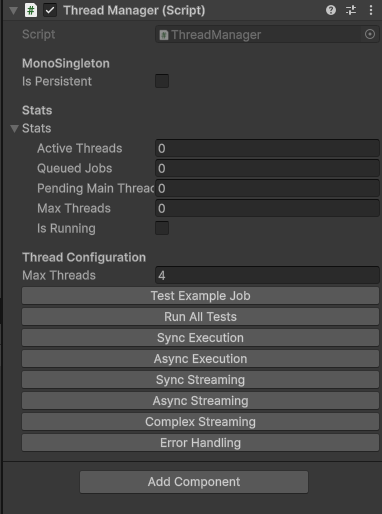
The Stats Panel
One thing I added that proved immediately useful in production — live stats visible in the Unity Inspector during Play Mode:
public struct ThreadManagerStats
{
    public int ActiveThreads;     // threads currently processing a job
    public int QueuedJobs;        // jobs waiting across all thread queues
    public int PendingMainThreadActions;  // results waiting to fire
    public int MaxThreads;        // pool size
}
When your game is lagging and you suspect threading, open the Inspector. If QueuedJobs is climbing and ActiveThreads is maxed — your pool is undersized. Increase maxThreads. No code change needed. Just the Inspector.
Where I Use It In Production
WitClientApi — every HTTP call goes through ThreadManager. The API layer never blocks the main thread. Responses fire back as Unity events.
VR Speech Trainer — Smule audio analysis runs on a background job. Analysis results fire back to update the in-headset feedback panel.
Networking projects — socket read loops run as long-lived streaming jobs. Incoming packets fire back to the game layer as events.
Save systems — file reads and writes go through QuickThreadJobs.ReadFileAsync / WriteFileAsync. The game never freezes on save.
Five to six production projects. Zero threading exceptions in shipped builds.
Get It
The package is public on GitHub:
ThreadManager — Reusable Unity Threading Package
Requires the Design Patterns package from the same repository for the MonoSingleton base class.
Add via Unity Package Manager using the Git URL. Drop ThreadManager on a GameObject. Set maxThreads in the Inspector. Start enqueuing jobs.
What This Package Taught Me
1. The main thread rule is a feature, not a bug
Unity’s single-threaded rendering model exists for good reasons. ThreadManager doesn’t fight it — it works with it. Background work off the main thread. Results delivered back safely. That’s the right division of responsibility.
2. Event-driven beats async/await for Unity’s mental model
Unity developers think in events — OnTriggerEnter, onClick, onValueChanged. UnityAction callbacks fit that model naturally. await does not. ThreadManager speaks the language Unity developers already know.
3. A thread pool with Inspector controls saves debugging time
Being able to see ActiveThreads and QueuedJobs live in the Inspector during Play Mode has caught more performance issues faster than any profiler session. Build observability into your tools.
4. Streaming jobs change what’s possible
Once I had progress callbacks working reliably, I started using them everywhere — loading screens, batch imports, real-time data processing. The pattern unlocks a whole category of UX that’s painful to build without it.
What’s Next
ThreadManager is one piece of a larger system. The Design Patterns package it depends on deserves its own breakdown — especially the singleton implementation, which solves several problems that DontDestroyOnLoad singletons create.
→ Coming next: Design Patterns for Unity — Why I Stopped Using DontDestroyOnLoad and What I Use Instead
Building Something That Needs Real Threading in Unity?
If your Unity project is hitting main thread limitations — API calls, file operations, networking, real-time data processing — this is the kind of architecture we bring to every project at WitShells Studio.
📩 sayedsulaiman607@gmail.com · cto@witshells.com 💬 WhatsApp Me →
Tags: Unity Threading, Unity Multithreading, C# Threading, Unity Background Jobs, Unity Performance, Unity Package, Game Development, Unity Job System Alternative, Unity Async, Open Source Unity, WitShells Studio
About the Author
Syed Suleman Shah is CTO of WitShells Studio — a VR and interactive experience studio delivering immersive environments for education, defense, and enterprise clients across Pakistan and the Middle East.
© 2026 WitShells Studio (SMC-Private) Limited. All rights reserved.